
The ContentStudio alternative that's simpler to run
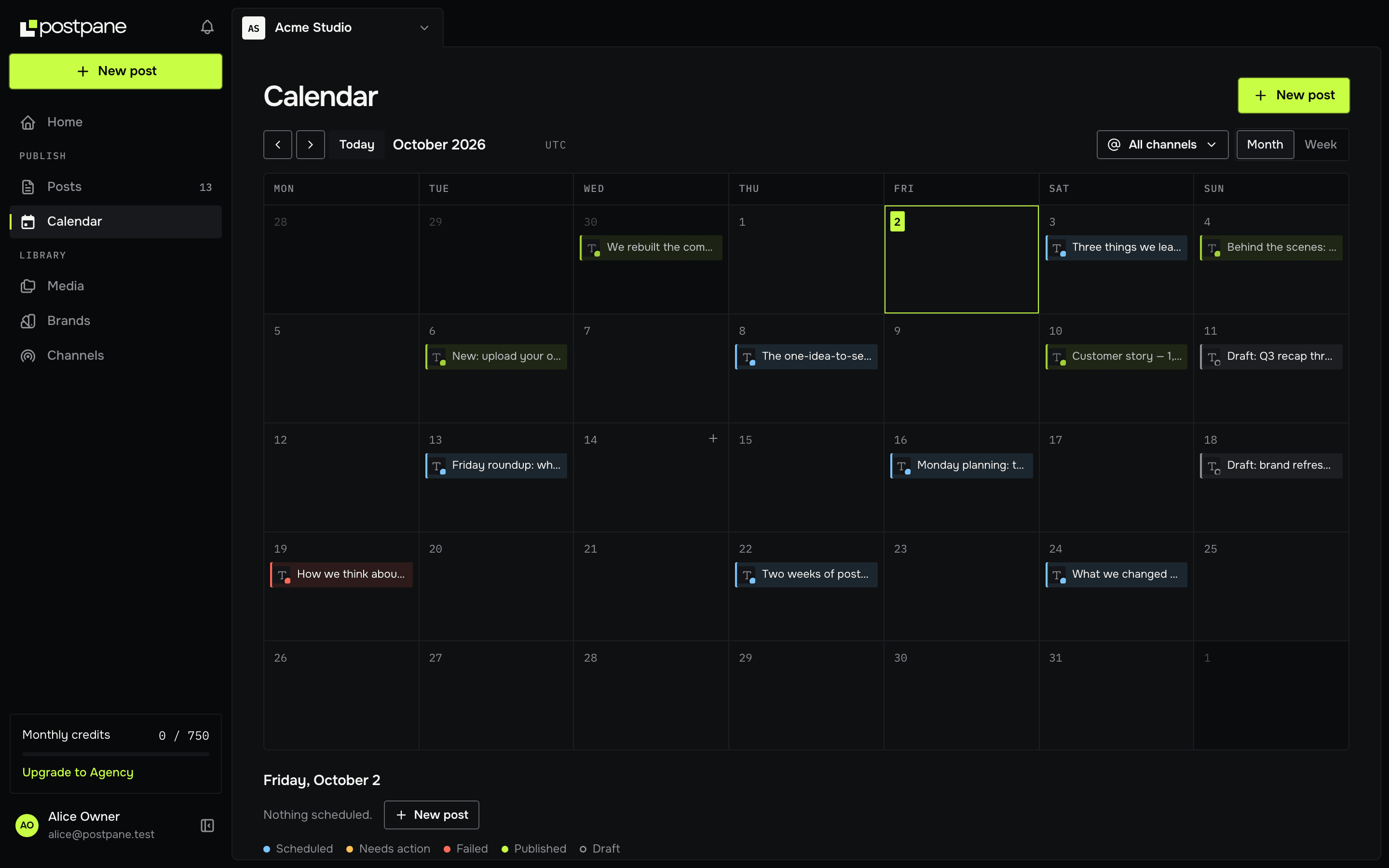
A calendar, a composer and your comments, publishing to Instagram, Facebook, LinkedIn, TikTok and X. It has a free plan, and comment replies are on every plan.
- 5 channels
- on Creator, from $15/mo. No per-channel pricing.
- Comments
- and replies included on every plan, the free one too.
- Credits
- for AI, so you pay for what you use and nothing when you don't.
ContentStudio covers a lot: content discovery, a social inbox, AI writing and agency-grade workflows. If you use all of it, it's good value. If you mostly plan, publish and reply, you're paying for, and working around, the rest.
Postpane keeps to the core. You get one calendar, one post tailored for each network, and comment replies and per-account analytics on every plan. There's a free plan to start on, so you can try it with your real accounts.
Postpane vs ContentStudio
A focused scheduler next to a broad suite.
| Feature | Postpanefrom $15/mo | ContentStudiofrom $19/mo |
|---|---|---|
| Free plan | 1 channel, 30 posts/mo | 7-day trial |
| Entry plan, billed yearly | $15/mo, 5 channels | $19/mo, 5 accounts |
| Networks | 5 (7 more coming soon) | More, including X and YouTube |
| Content calendar with drag-to-reschedule | ✓ | Yes |
| Per-network captions, previews and checks | ✓ | Yes |
| First comment on publish | ✓ | Yes |
| Reply to comments on published posts | Every plan | Advanced plan and up |
| Per-account analytics | Every plan | Yes |
| Import your past posts | ✓ | Not listed |
| Workspaces, roles and custom roles | Pro and up | Advanced plan and up |
| AI post design | On credits | Yes |
ContentStudio details come from its public website and may have changed since. Check its site for the latest.
Choose Postpane if
- You mostly plan, publish and reply, and want a tool that's quick to learn.
- You want comment replies on the entry plan, not from a higher tier.
- You want a free plan to try with your real accounts.
ContentStudio may suit you better if
- You need AI image generation.
- You want content discovery, a social inbox and agency tooling in one suite.
- You need X or YouTube publishing today.
Moving from ContentStudio to Postpane
Connect your accounts
Start on the free plan and sign in to each network from Postpane. Nothing needs exporting from ContentStudio. Postpane publishes to Instagram, Facebook, LinkedIn, TikTok and X.
Bring in your past posts
From a channel's page, import your recent posts from the network itself: up to 30 per channel on Free, 100 on Creator and 250 on Pro. They show on the channel's page with their likes, comments and shares, so you can see what worked before you switched.
Move what's scheduled
Postpane can't import scheduled posts from ContentStudio, and it has no posting-slot queue: each post gets its own time on the calendar. Copy across the next week or two, then remove them from ContentStudio so nothing goes out twice.
Bring your team
On Pro and up, invite teammates into workspaces with roles, or make custom roles. ContentStudio's entry plan has one user; team collaboration starts on Advanced.
Cancel ContentStudio when it's empty
Keep ContentStudio until the last post scheduled there has gone out, then cancel. Run both side by side for as long as you like.
ContentStudio alternative — FAQ
Is Postpane a good ContentStudio alternative?
If you're a creator, founder or small team who mostly needs to plan, publish and reply, yes. ContentStudio is a broad suite with content discovery, a social inbox and agency tooling. Postpane is narrower and quicker to learn, and it has a free plan to start on.
Does Postpane have a free plan?
Yes, free forever with no card: 1 channel, 30 posts a month, the calendar, analytics and comment replies. ContentStudio offers a 7-day trial rather than a free plan.
Can I reply to comments on the entry plan?
Yes. Comment replies are on every Postpane plan, the free one included. ContentStudio includes its social inbox from the Advanced plan up.
What about AI?
Both write with AI. Postpane's AI also designs branded posts and carousels; ContentStudio generates images, which Postpane doesn't. If AI images are what you need, ContentStudio is ahead.
How do I switch from ContentStudio to Postpane?
Connect your accounts on the free plan, import your past posts from each network, then copy your scheduled posts across and delete them in ContentStudio. Keep ContentStudio until its last post has gone out, then cancel.
Can I import my scheduled posts from ContentStudio?
No. Postpane can't read ContentStudio's planner, so copy the next week or two across by hand. Published posts can be imported from the networks themselves.